
At a glance
To track recurring subscriptions, you need to check five places where charges hide: your bank statements, UPI AutoPay mandates (in Google Pay, PhonePe, and Paytm), card e-mandates, the Google Play and Apple App Store subscription pages, and your email receipts. Most people pay for 8–12 active subscriptions but can name only about 5 — and in Eyespender's onboarding data, new users underestimate their true recurring spend by 40–60%. This guide shows you how to find every subscription in about 30 minutes, then keep them tracked automatically.
Why Tracking Subscriptions Is Harder Than It Should Be
Recurring payments are split across several systems that never talk to each other:
| Where the charge lives | Typical subscriptions | Where to check |
|---|---|---|
| Wallet / UPI AutoPay | Netflix, Disney+, Spotify, savings plans | GPay / PhonePe / Paytm autopay settings |
| Card e-mandates | International SaaS (Adobe, ChatGPT, iCloud), gyms | Bank app → manage mandates / statements |
| App store billing | In-app subscriptions billed as "Google Play" or "Apple" | Play Store / App Store subscription pages |
| Wallets & direct debits | Telecom plans, some OTT bundles | Wallet transaction history, bank statements |
Add merchant names that don't match the service (your Sony LIV charge may appear as an aggregator's name), different billing dates for each service, and free trials that quietly convert — and the true monthly total becomes invisible. That's the gap this guide closes.
How to Find All Your Subscriptions: 6 Steps
Step 1 — Scan 3 months of bank statements
Download your last three months of statements and search for repeating debits. Three months matters because it catches quarterly billing. Mark anything that appears more than once with the same amount — including small charges of $2.99–$9.99, which are the easiest to miss and add up fastest.
Step 2 — Check wallet and autopay mandates
Wallet and autopay lists are where many subscriptions now live, and every app hides the list in a different place:
- Google Pay: Profile picture → Autopay → view active, paused, and expired mandates
- PhonePe: Profile → Payment Management → AutoPay → active mandates
- PayPal: Settings → Automatic Payments
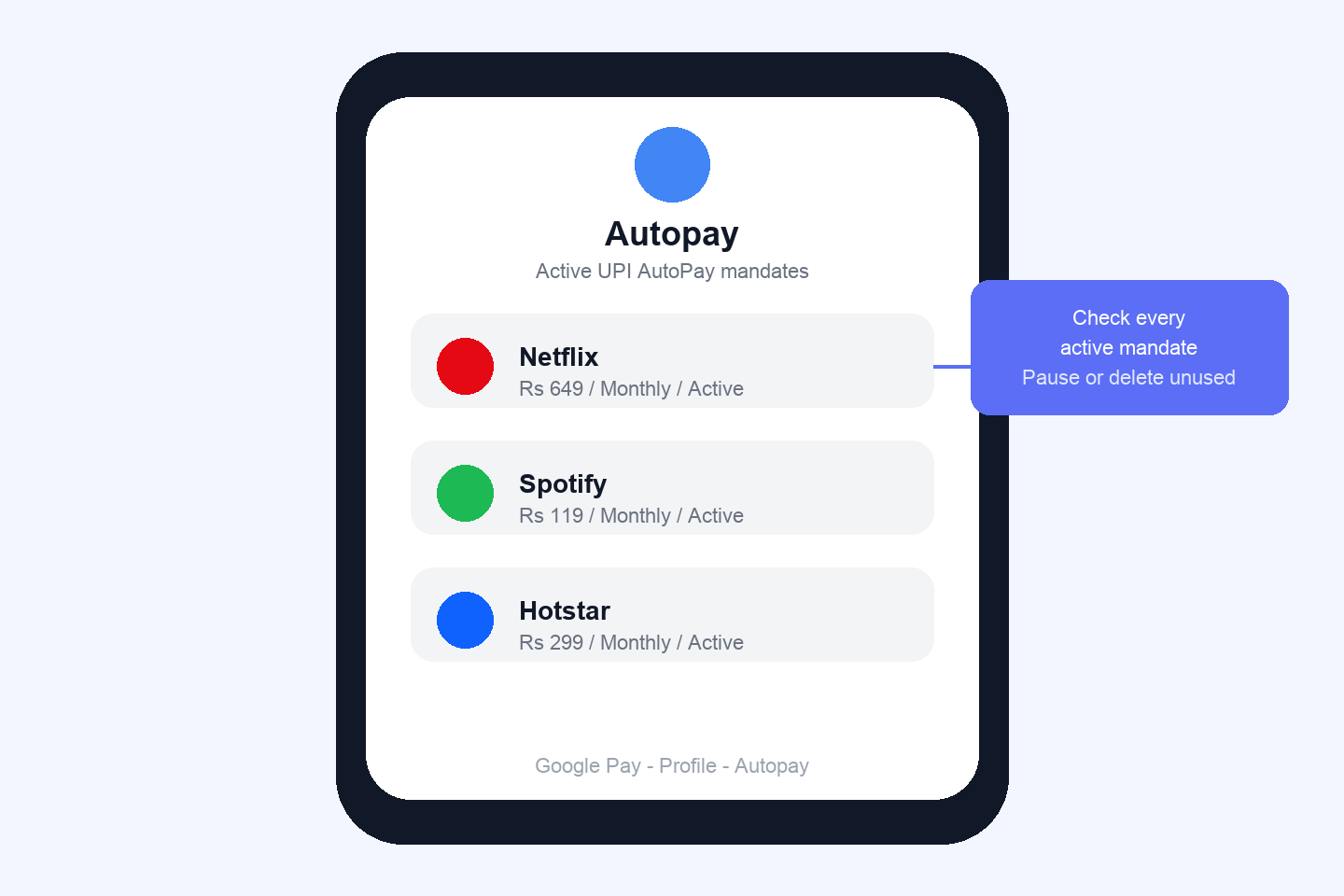
Review every active mandate. Small recurring charges often renew silently — which is exactly why forgotten mandates persist for months.
Step 3 — Check card e-mandates in your bank app
Most banks show a manage-mandates or standing-order section listing recurring authorizations on your cards. International subscriptions billed in USD — Adobe, ChatGPT Plus, Notion, iCloud — usually live here. Note the billing currency: FX moves, so the local amount can change month to month.
Step 4 — Open your app store subscription pages
Charges labeled just "Google Play" or "Apple Services" hide real subscriptions:
- Android: Play Store → Profile → Payments & subscriptions → Subscriptions
- iPhone: Settings → your name → Subscriptions
This is where in-app upgrades, game passes, and app-billed OTT plans surface — often duplicating a service you also pay for directly.
Step 5 — Search your email
Search your inbox for "receipt," "invoice," "renewal," "payment successful," and "your subscription." Ten minutes of searching typically surfaces one or two services the statements missed — usually annual renewals or services on a card you rarely check.
Step 6 — Centralize everything in one tracker
A spreadsheet works — until the first billing date changes or a price increases. A dedicated subscription tracker keeps every service, amount, billing date, and payment method in one dashboard, sends renewal alerts 7, 3, and 1 day before each charge, and shows your true monthly and yearly total in USD. Eyespender's free plan covers your first subscriptions with no credit card required, and the Chrome extension can detect subscriptions from your browser activity as you go.
How Much Are Your Subscriptions Actually Costing You?
A typical subscription stack in 2026: Netflix ($15.49) + Spotify ($11.99) + Disney+ ($13.99) + iCloud/Google One (~$3) + Amazon Prime (~$12.50/mo equivalent) + one SaaS tool ($10+) = $50–$80 per month, or over $700 a year — before adding family plans, gym memberships, or work tools. In Eyespender's onboarding data, most users discover their real total is 40–60% higher than their estimate, and the most common finding is at least one subscription they'd completely forgotten.
How to Cancel Unwanted Subscriptions
Cancel at the source, not just the reminder:
- Wallet autopay: open the same mandate screens from Step 2 and tap Pause or Delete on the mandate — this stops future charges even if you can't log in to the service itself.
- Card e-mandates: cancel in the service's account settings first, then (if charges persist) revoke the mandate in your bank app.
- App store: cancel from the Play Store/App Store subscription page — cancelling the app alone does not stop billing.
The trial trap: when you start any free trial, set a reminder for two days before it converts. (This is exactly what renewal alerts automate.)
For a deeper walkthrough, see our guide on how to cancel unwanted subscriptions.
Frequently Asked Questions
- What is the best way to track subscriptions?
- The best way to track subscriptions is to audit all four payment channels once — bank statements, wallet autopay, card mandates, and app store subscriptions — then maintain the list in a dedicated subscription tracker with renewal alerts. Manual audits find what you have today; automatic alerts prevent silent renewals tomorrow.
- How do I see all my autopay mandates?
- Open Google Pay Autopay, PayPal Automatic Payments, Apple Wallet, and your bank's standing-order list. Each screen lists every active, paused, and expired mandate linked to that app, and you can pause or delete mandates directly from there.
- How do I find subscriptions charged as "Google Play" on my statement?
- A bank charge labeled "Google Play" is an in-app subscription. Open the Play Store → Profile → Payments & subscriptions → Subscriptions to see the actual service behind the charge, and cancel it from that same screen if unwanted.
- Why do my subscription charges vary every month?
- Two common reasons: USD-billed services (Adobe, ChatGPT, iCloud in some setups) fluctuate with the USD exchange rate, and some plans add taxes or mid-cycle upgrades. A tracker that records the billing currency shows you the real pattern instead of a confusing statement line.
- Is there a free subscription tracker?
- Yes — Eyespender's free plan lets you track your first subscriptions with renewal alerts and a spend dashboard, with no credit card required. Paid plans from $2.99/month add unlimited subscriptions, the encrypted credential vault, and the AI spend advisor.
Ready to see your real number?
Create a free Eyespender account — add the subscriptions you found in Steps 1–5, and your true monthly total (probably higher than you guessed) appears on one dashboard, with alerts before every future charge.
Last updated: July 2026 · By the Eyespender Team