
At a glance
Most people with card or wallet autopay have 5–10 mandates running — and at least 2 are for unused services. This guide shows how to find every mandate in your bank, PayPal, Apple, and Google Pay apps, cancel what you don't need, and stop silent renewals — all in under 10 minutes.
You approved a UPI AutoPay once - maybe for a streaming app, a gym subscription, or a mutual fund SIP. And then you forgot about it. Every month, quietly, money leaves your account. You don't notice. The merchant counts on that.
The average person with autopay active has 5 to 10 mandates running in the background — and at least 2 of them are for services they no longer use. That's anywhere from $10 to $40 leaking silently every month.
This guide will help you find every active autopay mandate on your bank, PayPal, Apple, and Google Pay, cancel the ones you don't need, and stop silent renewals — all in under 10 minutes.
Before you read further
Cancelling a UPI mandate does not automatically cancel your subscription with the merchant. You need to do both - cancel the mandate AND cancel the service. We explain this in detail below.
What Exactly Is a UPI AutoPay Mandate?
A UPI AutoPay mandate is a standing payment instruction you give to a merchant. It tells your bank: "Allow this merchant to debit my account automatically, on a set date, for a set amount - without asking me every time."
It's the digital equivalent of a post-dated cheque - except it repeats automatically. You set it up once, and it runs indefinitely until you cancel it.
Common mandates people forget about include:
- OTT subscriptions (Netflix, Disney+, Max, Spotify, YouTube Premium)
- Gym or fitness app memberships
- Mutual Fund SIPs
- Insurance premiums
- News and magazine subscriptions
- Cloud storage plans (Google One, iCloud)
- Software subscriptions (Adobe, Canva, Notion)
- EMI auto-debits for loans or credit cards
- Utility bill autopay
Did you know?
A mandate created via GPay may not show up in PhonePe - and vice versa. To see ALL your mandates, you need to check every app you've used, plus your bank app directly.
Autopay rules — what you must know
Card networks and banks keep tightening how recurring payments work. Here's what that means for your money:
1. Mandatory 24-Hour Pre-Debit Alert
Before any recurring payment is debited, your bank or payment app must notify you at least 24 hours in advance. This alert must include the merchant name, amount, and debit date. Critically - this notification gives you a window to cancel the mandate before the money leaves.
Eyespender tip
Never ignore pre-debit alerts. When you see one for a service you no longer use, cancel immediately. You have until the debit time to stop it.
2. Small charges often skip extra authentication
Recurring payments below a bank's threshold often go through automatically without an extra OTP each time — making them even more invisible.
This is convenient, but it also means money can leave your account completely silently unless you're actively watching your alerts.
3. You Can Cancel, Pause, or Modify at Any Time
You can revoke, modify, or pause most e-mandates at any time from your bank or wallet app. No merchant can prevent that. If a merchant resists cancellation, raise it with your bank or card issuer.
4. Zero Liability If You Didn't Authorize It
If a mandate is created without your knowledge or a debit happens without proper notification, you are entitled to zero liability and a full refund, provided you report it promptly to your bank.
Step 1 - Find All Your Active UPI Mandates
Start by doing a full audit. Check every app you've ever used to make a UPI payment.
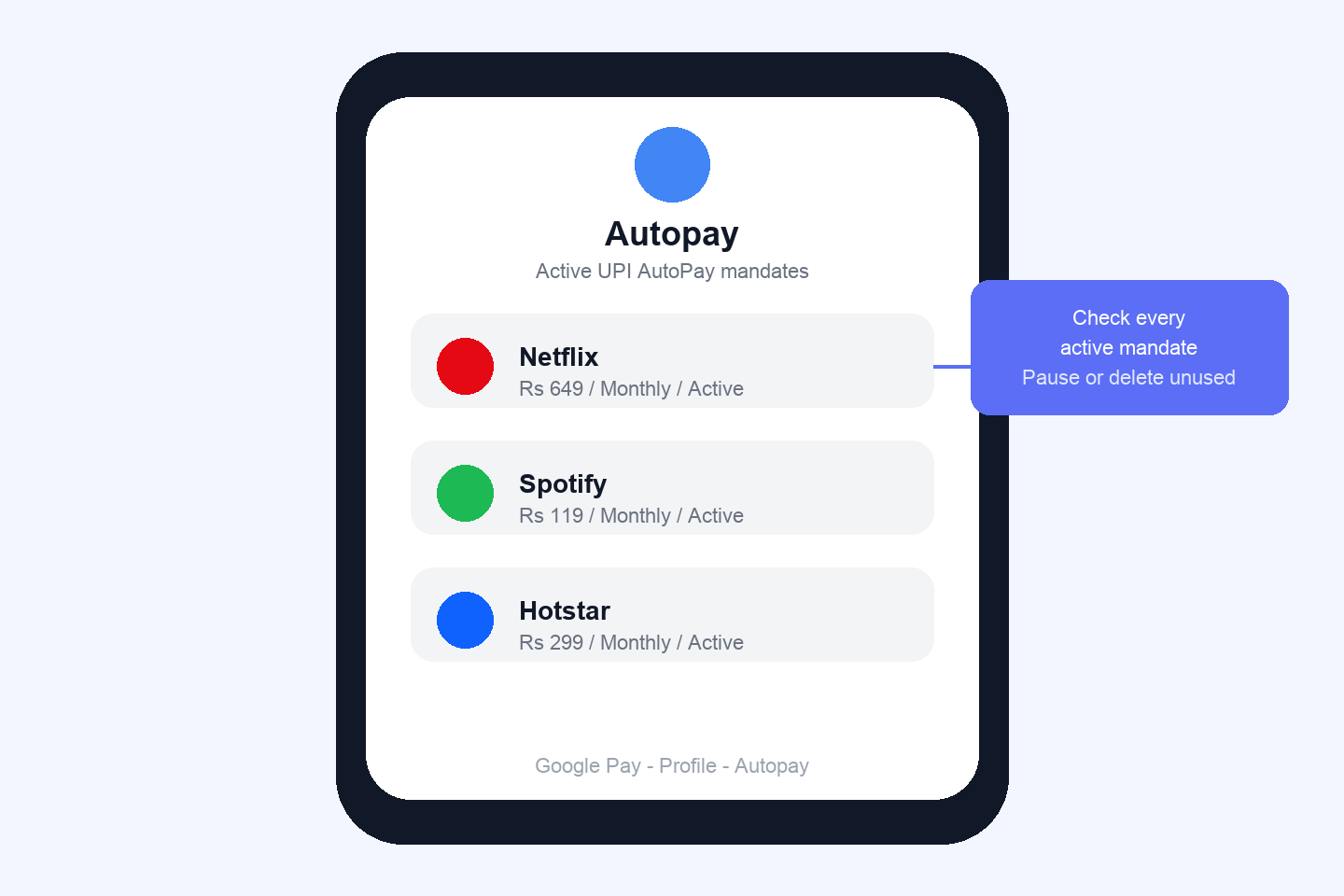
Google Pay - How to See Your Mandates
- Open Google Pay
- Tap your profile icon (top right)
- Tap "Autopay"
- You'll see all Live and Pending mandates listed here
PhonePe - How to See Your Mandates
- Open PhonePe
- Tap your profile picture (top left)
- Go to Payment Settings → AutoPay
- All your active mandates are listed here
Paytm - How to See Your Mandates
- Open Paytm
- Tap your profile icon (top left)
- Go to UPI & Payment Settings
- Tap "UPI Automatic Payments" or "Automatic Payments"
Your Bank App - The Ultimate Source of Truth
- Log into your bank's mobile app (HDFC, ICICI, SBI, Axis, Kotak, etc.)
- Look for a section called "Mandates," "UPI Mandates," or "My Mandates"
- This shows every mandate linked to your bank account - even ones not visible in any UPI app
Step 2 - Cancel the Mandates You Don't Need
Once you've identified the mandates, here's how to cancel on each platform:
Cancel AutoPay on Google Pay
- Open GPay → tap Profile icon (top right) → tap "Autopay"
- Select the mandate you want to remove
- Tap "Cancel Autopay" or "Remove"
- Enter your UPI PIN to confirm. Done.
Cancel AutoPay on PhonePe
- Open PhonePe → tap Profile picture (top left) → Payment Settings → AutoPay
- Select the mandate you want to stop
- Tap "Remove AutoPay" at the bottom. PhonePe may also offer a Pause option - use this if you want to skip temporarily without cancelling
- Enter your UPI PIN to confirm
Cancel AutoPay on Paytm
- Open Paytm → tap Profile icon → UPI & Payment Settings
- Tap "Automatic Payments" or "UPI Automatic Payments"
- Select the subscription → tap "Cancel Automatic Payment"
- Enter your UPI PIN to confirm
Step 3 - Also Cancel the Subscription (Critical)
Most common mistake
Cancelling the UPI mandate stops the payment - but it does not cancel your subscription or service. If you only cancel the mandate, the merchant may chase you for unpaid dues, suspend your account, or restart billing once you add a new payment method.
After cancelling the mandate in your UPI app, log into the merchant's app or website and cancel the subscription there too. The two actions together = full clean exit.
| Service Type | Where to Cancel Subscription | Refund Possible? |
|---|---|---|
| Netflix / Disney+ / Max | App Settings → Subscription → Cancel | Rarely (check T&C) |
| Spotify / YouTube Premium | Account → Subscription → Cancel Plan | Partial prorated refund sometimes |
| Mutual Fund SIP | Your AMC's app or portal → Pause/Stop SIP | No - but units are yours |
| Insurance Premium | Contact insurer directly - do NOT just cancel mandate | Policy may lapse - proceed with caution |
| Gym / Fitness Apps | App Settings or email to support | Usually no refund |
| Loan EMI | Do not cancel - contact lender first | Not applicable |
| Credit Card Bill Autopay | Bank app → Manage AutoPay → Disable | Not applicable |
For a broader subscription audit across bank statements and app stores too, see our recurring subscriptions guide.
Common Problems - And How to Fix Them
Problem: Mandate Not Showing in the App
This happens when you have multiple UPI IDs or bank accounts linked, or when the mandate was set up through a different device or older app version.
Fix: Check every UPI app you've ever used, and then check your bank app directly. The bank app always shows 100% of mandates linked to your account number.
Problem: Money Was Deducted After I Cancelled
If a payment was already scheduled and your cancellation came in after the processing window, the debit may still go through for that cycle.
Fix: The cancellation will prevent future debits. For the amount already deducted, contact the merchant for a refund. If they refuse without a valid reason, escalate to your bank or card issuer.
Problem: Cancel Button Not Appearing
Fix: Update your app to the latest version, clear the cache, log out and log back in. If the cancel button still doesn't appear, use your bank app to revoke the mandate directly.
Problem: Recurring Payments Continue Even After Cancellation
Fix: Verify the mandate status shows "Cancelled" in the app. If payments continue after that, it's a billing error - raise a dispute with your bank immediately and request a chargeback.
Pause vs Cancel - Which One to Use?
| Pause | Cancel / Revoke | |
|---|---|---|
| What it does | Temporarily stops payments | Permanently ends the mandate |
| Subscription continues? | Yes - may affect service access | No (unless you keep paying manually) |
| Can reverse? | Yes - unpause to resume | Must create a new mandate from scratch |
| Best for | Travel, short breaks, temporary pause | Services you're done with for good |
| Available on | PhonePe (most reliable), some banks | All UPI apps and bank apps |
Your Monthly Mandate Audit Checklist
Set a 5-minute reminder on the 1st of every month to run this check. It takes one month to find the leaks, and 10 minutes to fix them.
- Open GPay → Autopay → Review all Live mandates. Cancel anything unfamiliar or unused.
- Open PhonePe → AutoPay → Review all active mandates. Pause or cancel as needed.
- Open Paytm → UPI Automatic Payments → Cancel any dead subscriptions.
- Log into your bank app → Mandates section → Cross-check against what shows in UPI apps.
- Check your bank statement for the past month. Flag any recurring debit you can't identify.
- For every mandate you find: am I still actively using this service?
- For mandates you cancel: also cancel the subscription with the merchant directly.
- Check for pre-debit alert SMSes - note any upcoming debits you want to stop.
Real impact
Most readers who do this audit for the first time find $10–$40 in unused subscriptions per month. That's $120–$480 per year returning to your pocket — just from paying attention.
Want everything tracked in one dashboard after your audit? Add each remaining mandate and subscription to Eyespender so renewal alerts catch the next silent debit before it hits.
Frequently Asked Questions
- Can I cancel a UPI AutoPay mandate without the original app I used to set it up?
- Yes. Log into your bank's mobile app directly and go to the Mandates section. You can cancel any mandate from there, regardless of which UPI app was used to create it.
- Will the merchant know I cancelled the UPI mandate?
- Yes - the merchant's payment system will receive a notification that the mandate has been revoked. This may trigger emails or notices from the merchant asking you to re-add a payment method. This is normal. You are under no obligation to re-create the mandate if you no longer want the service.
- What happens to my subscription after I cancel the UPI mandate?
- The subscription typically continues until the end of the current billing cycle, after which it lapses or moves to a free tier. Some services may restrict access immediately. Always check the merchant's cancellation policy for specifics.
- Is a NACH mandate the same as a UPI AutoPay mandate?
- No - NACH (National Automated Clearing House) is a bank-level mandate typically used for EMIs, salary credits, and large recurring payments. UPI AutoPay is specifically for UPI-based recurring transactions. Both are now governed by the same RBI E-Mandate Framework 2026, but they run on different rails and are managed in different places (bank app vs UPI app).
- Can a merchant create a UPI mandate without my consent?
- No. Mandate registration requires your Additional Factor Authentication (AFA) - meaning your UPI PIN. Any mandate created without your PIN is unauthorized. Report it to your bank immediately for reversal and zero-liability protection under RBI rules.
- Do small recurring charges skip extra authentication?
- Small recurring card and wallet charges often process automatically without an extra OTP each time. Always review mandates in your bank and wallet apps.
- Will cancelling a UPI mandate cancel my subscription?
- No. Cancelling the UPI mandate only stops the automatic payment. You must also cancel the subscription separately with the merchant.
Last updated: July 2026 · By the Eyespender Team